5 free GitHub alternatives to paid software
Free open-source alternatives to ElevenLabs, Notion, Calendly, Semrush and Loom: VoiceStudio, AppFlowy, Cal.diy, OpenSEO and Cap, installed with Claude Code.
Read more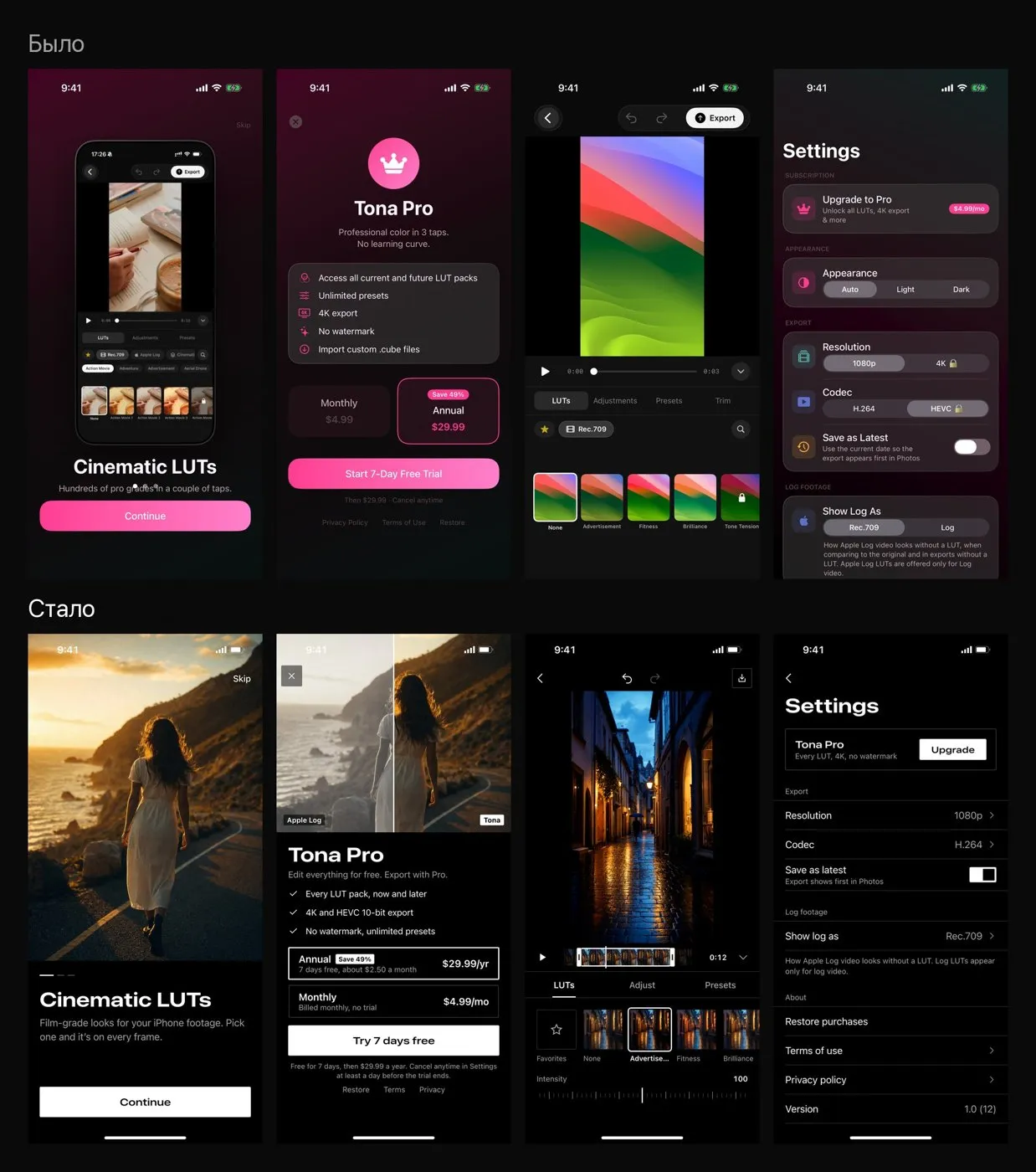
Ask Claude for a beautiful app design. You get a pink gradient, glass cards, pill buttons and a crown on the paywall.
That is how my Tona looked. It is an iOS app for colour in video that I am finishing in public on my channel. I redesigned it and packed the rules I used into a skill. The image above shows Tona before and after.
The model learned from millions of interfaces and defaults to the most common choice. And the most common choice right now is the AI look: gradients, glass, icons in coloured circles, everything centred. Each decision is fine on its own; together they make a template you recognise at first glance.
Saying “make it minimal” isn’t enough to fix that. You need a system and a list of bans.
Works for SwiftUI, React Native, Flutter and Compose. No code yet? It draws 402×874 HTML mockups.
Paste into Claude Code:
Install the skill https://github.com/vaykondev/mobile-design-skill into ~/.claude/skillsOr by hand:
git clone https://github.com/vaykondev/mobile-design-skill /tmp/mobile-design-skill
cp -R /tmp/mobile-design-skill/skills/mobile-design ~/.claude/skills/
Restart Claude Code and the /mobile-design command appears.
New screens:
/mobile-design design onboarding and paywall screens for my appAn existing app:
/mobile-design redesign this app, don't touch the featuresWithout a brand the skill uses the Mono character: black, a white accent, wide headings. With a brand, its colour becomes the only accent and the discipline stays the same.
skills/mobile-design/
  SKILL.md                    workflow
  references/tokens.md        tokens for SwiftUI, React Native, Flutter, Compose, HTML
  references/anti-patterns.md what Claude does by default and what to use instead
  references/screens.md       screen recipes with sizes
  references/checklist.md     pre-delivery check
The most useful file is anti-patterns.md: a list of what the model does on its own and what to replace it with. It is worth reading even without the skill if you design by hand.
The pink palette, glass cards, old onboarding art and phone mockups are gone. In their place: a black background, a single white accent and a new icon. The interface stopped competing with the video, and for a colour app that is the whole point.
The skill is free under the MIT licence. I share how I finish the app itself in the Telegram channel @vaykord_dev, and Tona has its own page.
Free open-source alternatives to ElevenLabs, Notion, Calendly, Semrush and Loom: VoiceStudio, AppFlowy, Cal.diy, OpenSEO and Cap, installed with Claude Code.
Read moreCurated lists, breakdowns and building my products in public. No course ads.
Subscribe