Tona in App Store review: one week from comeback to submission
3 min readVladyslav Kondratiev
Well, it has started. I submitted Tona for App Store review. It is my first own product, not a client one.
Tona is an iOS app for colour in video and photos: pick a clip, apply a LUT, fine-tune it and save to Photos. I started it a while ago, paused it in May and came back to it a week ago. Here is what I got done that week and what took the longest.
What I did in a week
A new design. The Mono look: black background, one white accent, no gradients or glass. I packed the rules I used into the /mobile-design skill.
My own LUTs for Apple Log 2. iPhone log footage looks grey, and you can’t finish it without the right LUT. Now Apple Log and Apple Log 2 are detected automatically, and log LUTs only appear for log footage.
Everything for the App Store. Screenshots, copy, a website, privacy policy, terms of use and notes for the reviewer.
That last item took longer than I expected.
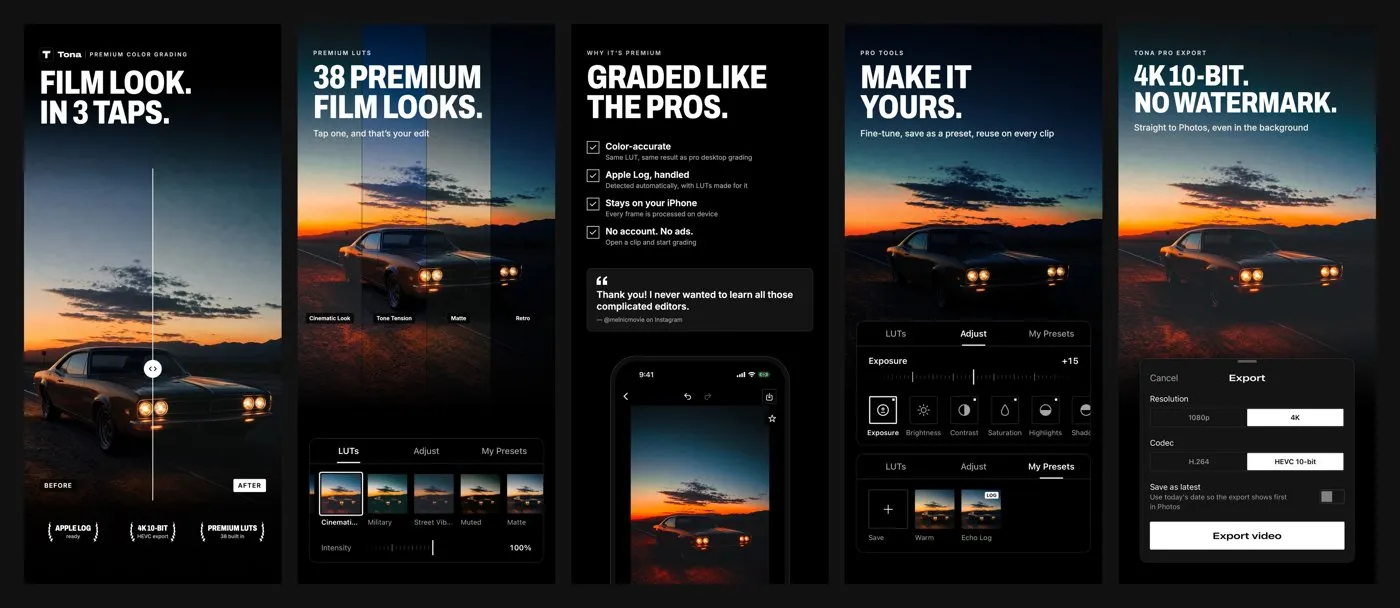
Screenshots: three options, one choice
I made three sets of screenshots and asked the channel which one I had picked. I went with C, and here is why:
Almost everyone sees the first 2–3 screenshots, very few scroll further. So before and after, plus the key line, right away.
The third screen is about trust: why the colour is accurate, no account, no ads, and a real review.
Apple also searches the text on screenshots. So APPLE LOG and 4K 10-BIT are there for a reason.
Where I almost slipped
I asked Claude to make the screenshots extra salesy: five stars, Apple badges, drawn reviews. It refused and explained why:
The App Store shows the rating above the screenshots itself. A new app has none, and drawn five stars next to it look like a scam.
Guideline 2.3: screenshots must honestly show the app. Anything that looks like an Apple award is an instant rejection.
In the US, fake reviews can cost over $50,000 in fines each.
Deception can get the whole developer account closed, not just the app.
So the laurels on the first screen stayed, but inside there are only facts.
Why the paperwork takes so long
The code was nearly done; everything around it wasn’t. To submit you need:
An app website with support, privacy and terms. Apple checks the links are live.
Privacy answers. What data the app collects. For Tona it’s simple: none, no account, everything is processed on the iPhone. You still have to fill the form in honestly.
Subscriptions. Editing in Tona is free; exporting needs Tona Pro: $5.99 a month or $39.99 a year with a one-week free trial. Each subscription needs a description, a screenshot and to be attached to the version, otherwise the reviewer can’t buy it and sends the app back.
Reviewer notes. How to check the main thing in a couple of minutes. Without them it is easy to get rejected just because the reviewer couldn’t find a feature.
What’s next
Now we wait for Apple. They may reject it. If they do, I’ll share why and how I fixed it.
Everything Tona does is on the app page. I post how the review goes in the Telegram channel @vaykord_dev.
Free open-source alternatives to ElevenLabs, Notion, Calendly, Semrush and Loom: VoiceStudio, AppFlowy, Cal.diy, OpenSEO and Cap, installed with Claude Code.